Plugins & Skins
Extend PEK TV without risking it. Plugins are written in Python, describe their screens as data, and run in a locked-down sandbox.
Plugins from PEK
Weather, TMDb Discover and Skin Maker ship with PEK TV and are listed above the separator on the Plugins page; third-party plugins are listed below it. Trakt is an additional PEK plugin.

Weather
v1.1.0 · by PEKCurrent weather and a 7-day forecast for a city you pick. Celsius or Fahrenheit. No account or key needed.
Navigation tab: Weather
Official, built in. Also feeds the dashboard's Weather widget.
TMDb Discover
v1.8.2 · by PEKBrowse trending, top rated, popular and now playing movies and TV page by page, filter by streaming service, watch trailers, see the cast and related titles, and see what you already own.
Navigation tab: Discover
Official, but still sandboxed. The only kind of plugin allowed to use PEK TV's built-in TMDb access, so users never enter an API key.
Trakt
v1.5.1 · by PEKScrobbles what you watch to Trakt and keeps your history, ratings and favorites in step both ways, including what you remove on Trakt. Every PEK TV profile connects its own Trakt account. Made for people who already use Trakt with Kodi.
Navigation tab: Trakt
Packaged for the PEK Store. Signs in with Trakt's device flow (a code you enter at trakt.tv/activate), so no password is typed into PEK TV. It is told what you play (title, year, season/episode, progress), never file names.

Skin Maker
v1.0.0 · by PEKMake your own look for PEK TV: pick an accent, background, cards and text, set the corner size, preview it live and save it. Start from any skin, from one accent colour, or from a pasted skin.json.
Opens from Settings → Appearance
Official, and the only plugin allowed to use the reserved skins permission.
Plugins in the real app
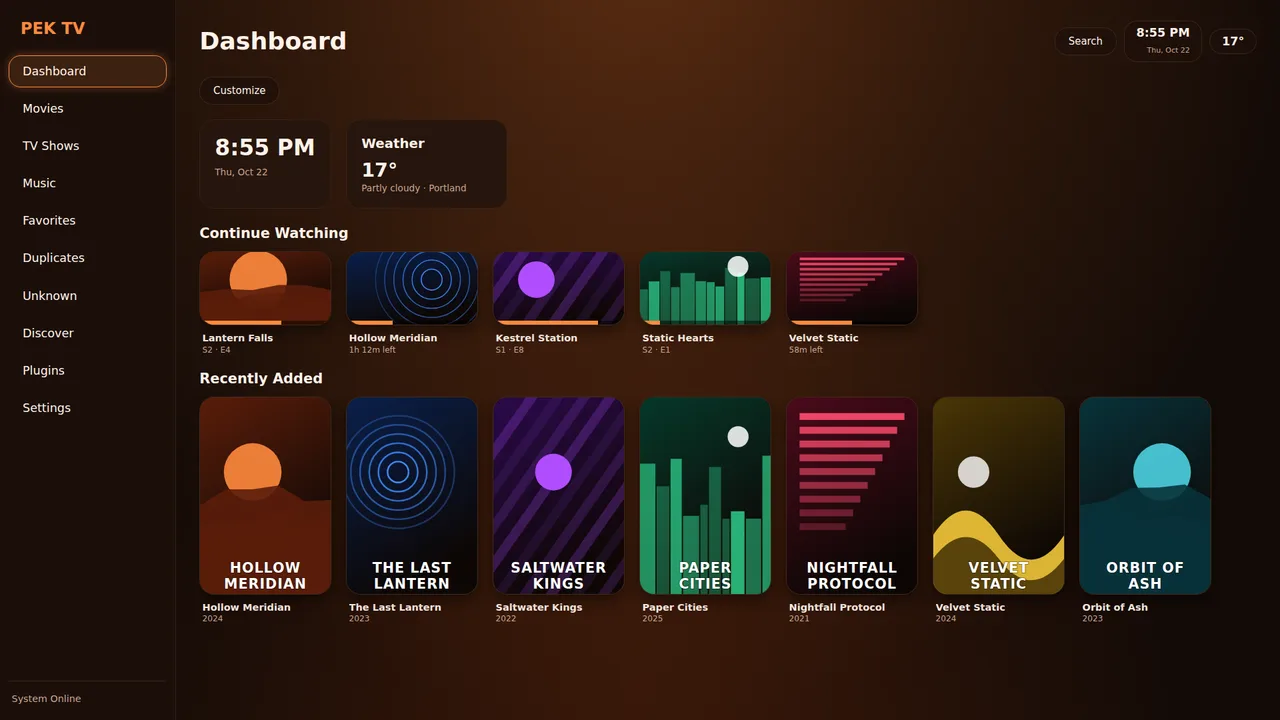
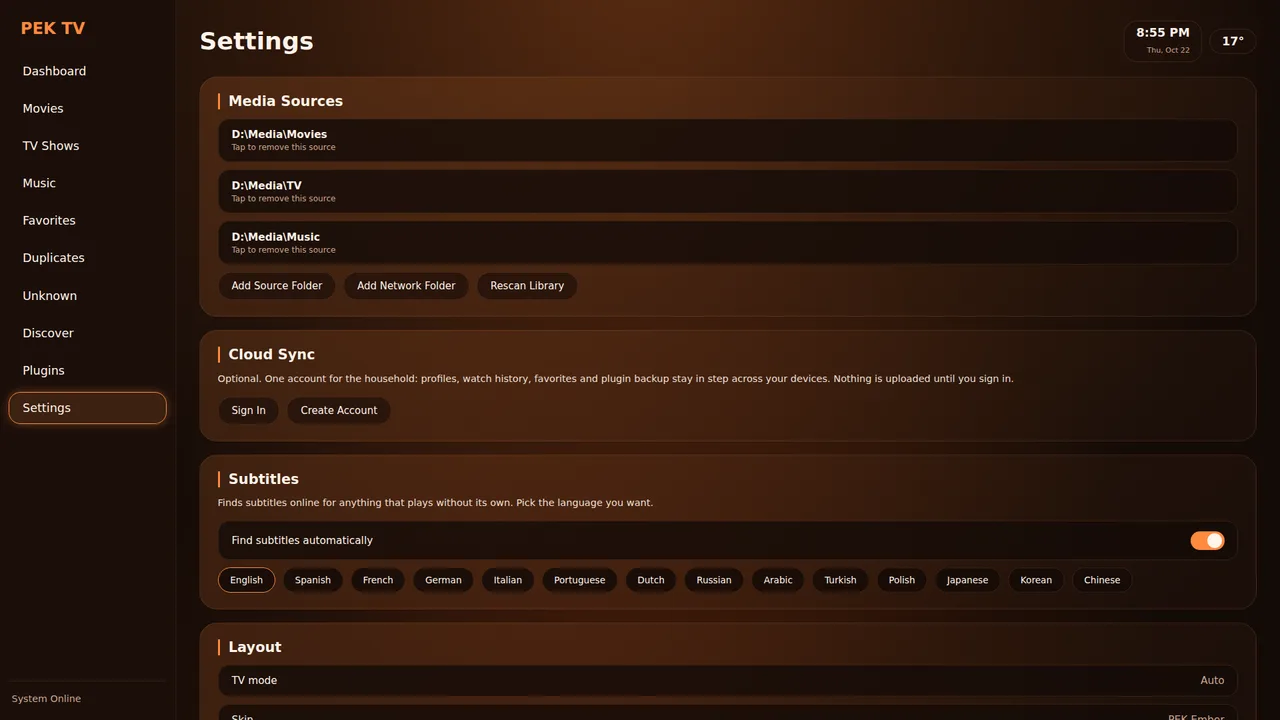
Weather is a dashboard widget and a full screen. Settings holds the plugin and skin switches, including the GitHub installer. Screens are drawn natively by Flutter, not in a web view.
- Install from a .zip, from GitHub (
owner/repo) or from the PEK Store - Hold a plugin's row to remove it
- Backed-up plugins restore on a new device after you confirm
Write your own plugin
A plugin is a folder (or zip) with plugin.json and screen.py, plus an optional backend.py.
1. Declare it
{
  "name": "My Plugin",
  "version": "1.0.0",
  "permissions": {
    "network": ["api.example.com", "*.cdn.example.com"],
    "storage": true,
    "library": true
  },
  "ui": { "navTab": "Discover" },
  "flutter": { "screen": "screen.py" }
}
An optional warning shows a screen before the permissions screen at install time:
"warning": {
  "title": "Before you install",
  "text": ["First paragraph (max 400 characters).", "Second paragraph."],
  "button": "I understand, continue"
}
2. Describe the screen
import pek_host as h
import pek_ui as ui

state = {"items": None, "error": ""}

def start():                      # once, when the screen first opens (optional)
    def work():                   # runs on another thread: may wait for the network
        return h.fetch_json("https://api.example.com/list")
    def done(result):             # back on the screen's thread; redrawn afterwards
        state["items"] = result["items"]
    def fail(message):
        state["error"] = message
    ui.background(work, done, fail)

def render():                     # returns the tree PEK TV draws natively
    if state["items"] is None:
        return ui.column(ui.spinner("Loading..."))
    return ui.column(ui.heading("Things"),
        [ui.card(i["name"], "", lambda i=i: show(i)) for i in state["items"]])

def show(item):
    ui.toast(item["name"])

def on_launch(intent):            # PEK opened the plugin on a title (optional)
    pass
3. Optional backend
# backend.py (optional): runs once at startup under a 10 second limit
import pek_host as h

def run():
    data = h.fetch_json("https://api.example.com/list")   # only hosts in plugin.json
    h.write_json("library.json", data)                    # only this plugin's data/ folder
    titles = h.library_titles()    # needs "library": true -> [{"title","year","kind"}]
Hooks: plugins that react to playback
A screen only runs while it is open. Plugins that must act while you watch (scrobbling, presence displays) add a hooks file. This is how the Trakt plugin works.
# plugin.json: "permissions": {"send": true, "playback": true, "watched": true, ...}
#             "flutter": {"screen": "screen.py", "hooks": "hooks.py"}
import pek_host as h
import pek_ui as ui

def on_event(ev):   # called by PEK TV with no screen open; max 25 s; one event at a time, in order
    t = ev["type"]  # app_start | tick | play | pause | resume | stop | watched | rated | favorited | profile_removed
    if t == "play":
        pass        # ev has kind, title, year, season, episode, position, duration, percent
    elif t == "tick":
        pass        # every 3 minutes while the app is open and nothing is playing: pull new data
        # ui.set_watched(...) marks Watch History; pass at=<seconds since 1970> for the real date
A slow or broken hook never holds up the player: every call is fire-and-forget. Watch History changes are not reported back to the plugin they came from, so an import can't echo to the service it came from.
Permissions
No permission listed means no access. The install screen explains each one in plain language.
| Permission | What it allows |
|---|---|
network | HTTPS host names only (no IPs, no localhost). *.x.com matches subdomains. Poster art, provider logos and the YouTube trailer host are only allowed from hosts listed. |
storage | A small private key/value store plus read access to plugins/<id>/data/. |
library | Lets the Python backend call pek_host.library_titles(): titles and years only, never file names or folders. |
favorites / watched | Save favorites that sync via PEK Cloud; read or mark Watch History, ratings and favorites for the items the plugin asks about. |
providers / plugins | Open a streaming service's app on a title; hand a title to another plugin that can play it. |
send / playback | send lets a plugin POST (with an Authorization header) to its listed hosts only. playback lets its hooks file hear play, pause, resume and stop events with title, year, season, episode and progress, and when you rate, favorite or mark something watched. Never file names, folders, library ids or stream addresses. |
torrent | Lets a screen call ui.play_torrent(...). The plugin never sees the search provider's address or key. PEK TV ships with no search provider. |
Backend guard
Allowed imports are a short list (json re math datetime collections itertools html urllib.parse hashlib random...) plus pek_host. Not allowed: eval exec compile open getattr __import__, any _attribute, os sys subprocess socket ctypes.
Limits
Zip: 200 files, 2 MB per file (200 KB per .py), 8 MB total, no hidden files. Draw 6 s, tap handler 15 s, background job 25 s.
What a zip may hold
.json .css .md .txt, images, fonts and .py. Any .js file, or a plugin with only a ui.js, is refused.
Publish on GitHub
Anyone can install your plugin straight from a public repository. PEK TV keeps no list, so there is nothing to submit.
- Put
plugin.jsonandscreen.pyat the top of your zip, or inside one folder. - Make a GitHub Release and attach the zip (up to 8 MB). PEK TV installs the latest release.
- Keep the folder name or
plugin.jsonname the same across versions so an update replaces the old one.
Users go to Plugins → Install from GitHub and type owner/repo. It shows as unverified, with the same sandbox, scan and permissions screen as any other install.
Skins
A skin changes colours and corner size, nothing more. It can't run code, contain CSS or reach the network.
{
  "name": "Sunset",
  "author": "PEK TV",
  "version": "1.0.0",
  "description": "Warm dusk colours with soft rounded corners.",
  "tokens": {
    "bg": "#1a0f14",
    "text": "#fff1e8",
    "accent": "#ffb347",
    "radius": "14px"
  }
}
Bundled skins: PEK Ember (default), Mono, Cream, Night red, Green, Neon. Install from Settings → Appearance, from a .zip or owner/repo. Limits: up to 60 files, 2 MB each, 6 MB total.
# four colours, the rest follows
tools/make_skin.py new --name Sunset --bg '#1a0f14' --surface '#2a1820' --text '#fff1e8' --accent '#ffb347' --radius 14

# one accent is enough (dark by default, --light for a light skin)
tools/make_skin.py new --name Ocean --accent '#38bdf8'

# check a skin zip
tools/make_skin.py validate dist/sunset.zip
Or use the official Skin Maker plugin inside the app, which refuses colour pairs that make text hard to read.